 icon on the right side of the application tool bar opens a menu of file operations for managing configurations.
Pulse Building
The icon on the right side of the application tool bar opens a menu of file operations for managing configurations.
Resets your current Pulse Building application configuration to default settings.
|
SCPI Command |
[:SOURce]:RADio:PBUilding:PRESet |
|
SCPI Example |
RADio:PBUilding:PRES |
|
Couplings |
|
|
State Saved |
No |
|
Initial S/W Revision |
A.18.00 |
Opens a file management window where you can save your current Pulse Building configuration as a file (*.pwsg) for future use.
|
SCPI Command |
[:SOURce]:RADio:PBUilding:MEMory:STATe:SAVE <string> |
|
SCPI Example |
RADio:PBUilding:MEMory:STATe:SAVE "C:\test\pb.pwsg" |
|
Couplings |
|
|
State Saved |
Yes |
|
Initial S/W Revision |
A.18.00 |
Opens a file management window where you can open a previously saved Pulse Building configuration file (*.pwsg).
|
SCPI Command |
[:SOURce]:RADio:PBUilding:MEMory:STATe:RECall <string> |
|
SCPI Example |
RADio:PBUilding:MEMory:STATe:RECall "C:\test\test.pwsg" |
|
Couplings |
|
|
State Saved |
No |
|
Initial S/W Revision |
A.18.00 |
Opens a file management window where you can open a Keysight Signal Studio .pbp project file. Pulse Building settings file (*.pbp) is a binary file that contains the application information including the entire pulse library and entire pattern library.
Refer to Importing Signal Studio Project (.pbp) Files to know more.
|
SCPI Command |
[:SOURce]:RADio:PBUilding:WAVeform:IMPort:PBP <filepath> |
|
SCPI Example |
RADio:PBUilding:WAVeform:IMPort:PBP "C:\ComplexTest.pbp" |
|
Couplings |
|
|
Preset |
|
|
State Saved |
Yes |
|
Initial S/W Revision |
A.18.00 |
Imports a *.csv file containing a pulse pattern. The file is imported as the pattern specified within the file. If the specified pattern already exists, the following error is displayed
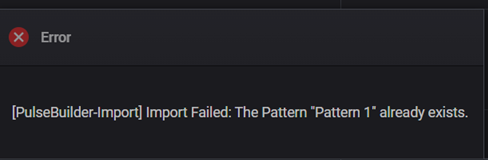
Refer to Importing and Exporting Patterns to know more.
|
SCPI Command |
[:SOURce]:RADio:PBUilding:WAVeform:IMPort:PATTern <filepath> |
|
SCPI Example |
RADio:PBUilding:WAVeform:IMPort:PATTern "C:\ test.csv" |
|
Couplings |
|
|
Preset |
|
|
State Saved |
Yes |
|
Initial S/W Revision |
A.18.00 |
Exports the complex pulse pattern to a *.csv file using the specified name. If the file already exists you are prompted whether or not to overwrite it.
Exporting a pulse pattern is the easiest way to generate a CSV file with the correct format. The exported file can be customized with Excel or other applications that support the CSV format.
Refer to Importing and Exporting Patterns to know more.
|
SCPI Command |
[:SOURce]:RADio:PBUilding:WAVeform:EXPort:PATTern <string> |
|
SCPI Example |
RADio:PBUilding:WAVeform:EXPort:PATTern "C:\test.csv" |
|
Couplings |
|
|
Preset |
|
|
State Saved |
Yes |
|
Initial S/W Revision |
A.18.00 |